As stated in previous posts, I have been researching the paternal line of my brother-in-law the last few months. I will mainly post about his great-grandparents because one of his paternal grandparents is still living. I have not found too much yet beyond his great-grandparents, who immigrated from Italy in 1907. This has been exciting for me because all of my ancestors have resided in the US or Canada since the 1850s or 1860s. Furthermore, I don't have any Italian ancestors at all, so this has been a new journey for me.
Pietro "Peter" Louis De Luca, Sr. was born about Oct 1877 or 1878, probably in Atina or Belmonte Castello. At that time, both villages were part of the Terra di Lavoro province in the Kingdom of Italy. Today, they are in the Frosinone province in the Lazio region of central Italy. They are about 90 miles southeast of Rome and about 70 miles northwest of Naples. Belmonte Castello is about 5 miles south of Atina. Atina currently has a population of about 4,500 people, while Belmonte Castello has a population of about 800 people. I've found a wonderful website about Atina by a British woman named Louise. Her maternal grandparents immigrated to the UK from Atina in 1911. Louise also has a page about Belmonte Castello. Louise fell in love with Italy after visiting family there, and she and her husband now live in the South Lazio region. It is a great website with lots of photos and even surnames of the areas of Atina and Belmonte Castello. You can tell that Louise is very passionate about Atina and Italian culture.
Peter married Clementina Matilda "Clara" Trillo between 1900 and 1903 in Italy, possibly in Arpino. Arpino is about 20 miles northwest of Atina and Belmonte Castello and is also in the Frosinone province. Clara was born 9 Jan 1886, possibly in Arpino. She was about 8 years younger than Peter. She was somewhere between 14 and 17 years old when they married. Peter was between 23 and 26 years old.
Peter and Clara had one child, Maria Puenta "Mary A." De Luca, in Italy before immigrating. Mary was born 15 Aug 1904. Peter, Clara, and Mary immigrated to the US in Sep 1907. They first settled in St. Louis, Missouri, before moving to a little Italian village called Rosati in St. James township in Phelps County, Missouri. In addition to Mary, they had six more children after they arrived in the US, two sons and four daughters: Elizabeth, Julius, Rose, Anna, Peter Jr. (my brother-in-law's grandfather), and Lena.
There is another wonderful website about Rosati and the Italian families that settled there. Steve Zulpo is the author of the website. He has several pictures of the De Luca family members:
Mary De Luca in the Knobview (aka Rosati) class picture of 1914
Julius, Elizabeth, and Rose De Luca in the Knobview class picture of 1918
Peter, Sr. with Rose and Anna processing grapes
Mary De Luca with the First Communion Class of 1920 at St. Anthony's Church
Peter, Sr. and Clara
Peter, Sr. and Peter, Jr.
Peter, Jr. and Anna with the First Communion Class of 1924 at St. Anthony's Church
Clara harvesting grapes
Quarry at the old De Luca farm
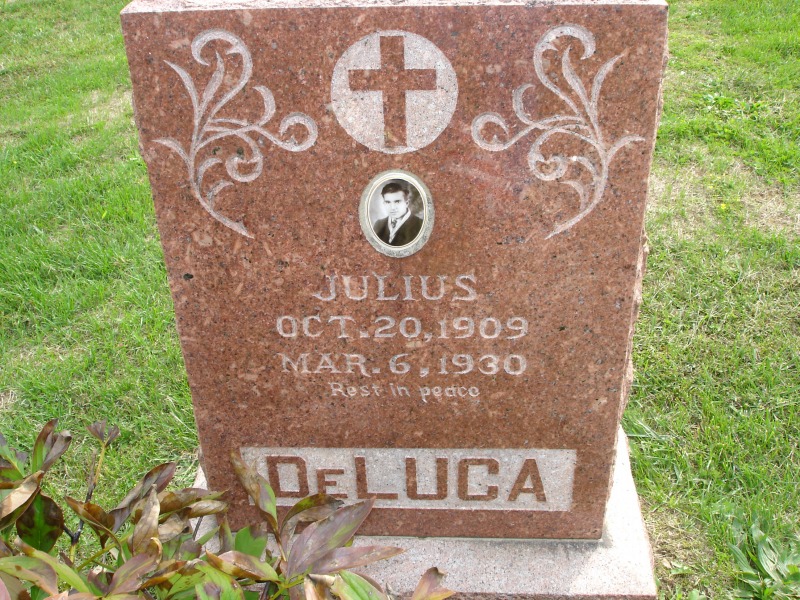
Tombstone of Julius De Luca
Over the next several days, I will be posting several documents I have found on the De Luca family. These include a ship passenger list, census records, a WWI draft registration, and death certificates. I will also present my analysis of these documents. I invite any of the De Luca family members to make corrections or contribute additional information. Enjoy!
Links to other posts in this series:
De Luca Family: Immigration Records
De Luca Family: 1910 US Census
De Luca Family: WWI Draft Registration
De Luca Family: 1920 US Census
De Luca Family: 1930 US Census
De Luca Family: Death Records
Title Header

Sunday, May 3, 2009


The Evolution of My Filing System
I think I have changed my filing system too many times. When I first started genealogy, I had no filing system. I had a blue shoulder bag that I carried around to the library and shoved copies in it, usually in the pocket of the one binder I had. The thought really scares me now. This lasted from the time I was about 13 to the time I was about 23. Of course, I was very young, so I did not have any original copies of anything. My grandparents and parents still had those things. Most of the "documents" consisted of print-outs of WorldConnect databases and FamilyTreeMaker personal pages. Eventually, the bag overflowed, and I had to start putting documents in another bag. These miraculously survived all my moves from dorm to dorm during college college. Once, I even lent my then 13-year-old cousin who I was training to be a genealogist (I was about 20) some copies of death records and such that I didn't bother to copy before giving them to her. My grandmother still had the originals, but that was still risky. Several months later, I asked her for them, and she didn't know where they were. Luckily, we found them in the attic. I'll never do that again. That was in the days before scanners came on every printer (or before I could afford printers with scanners).
When I was about 23 or 24, and on my way to becoming a real adult, I finally decided to start organizing. My first I system used binders with tabs for each surname. I also had a binder strictly for pedigree charts in number order (these were done in the day when you numbered each pedigree chart with some formula that I can't remember now and charts were handwritten...I still have that binder b/c I can't seem to part with my original work). I organized the papers in the surname sections of the binders in chronological order. This was okay, except that it was hard to lug those binders around because they were pretty hefty. I used 2 or 3 inch binders with several surnames in each one. But this system was still much better than a blue shoulder bag and an overflow bag.
So about 2 years later, I decided to switch to a folder system with a filing cabinet instead. I figured these would be easier to take around to libraries. So I basically transferred everything from the binders to the folders. I kept my folders by surname, with a few folders for more general info, such as a "Michigan" folder for documents pertaining to Michigan or even a particular county in Michigan and not to a particular family. This system was okay, but I still did not completely like it for some reason. It was partially due to the fact that my Pemberton folder was way too large. File folders make it harder to present info to family members. The papers frequently got out of chronological order.
Then I started reading about the filing system suggested by Liz Kerstens Kelly, maker of Clooz software, an electronic filing cabinet. She suggested filing documents by type of document with no regards to surname. Each document would have a unique idenifier, such as CEN 001 for a census record or BIR 001 for a birth record. I liked this idea b/c with the previous system I was using made up of surname folders, I was confused as to whether or not I should put a marriage record in the husband or wife's surname folder or both. Liz, as well as some other intro genealogy books I was reading at the time, also mentioned havng a set of documents that never ever leave home. These other genealogy books also suggested filing by couple rather than by surname. I liked this idea b/c that would make my Pemberton folder less cumbersome. I could break it up into couples rather than having one large folder for all Pemberton's. This also solved the problem of where to put a marriage record...in the couple's folder!
This is when I decided on two filing systems. The first filing system consists of documents that never leave home. These are filed by type of document without regard to surname. I use 2-inch binders for these. It does not matter that they are heavy b/c I never, ever bring these to libraries. But I also decided that I liked the filing by couple b/c the binders never leave home, so it is impossible to take them on a research trip to Michigan. I began using file folders for my couples, but I soon switched to smaller one-inch binders b/c binders just make it much easier to present to others. One-inch binders are not too terribly difficult to bring on research trips, provided you do not need more than a couple. If I do need more than a couple, I always have those file folders on hand so that I can put everything into those just for traveling purposes (not permanently). My binders are labeled by surname on the outside, with tabs for individual couples on the inside. In the front of the binder, I put an ancestor table like the one below. This comes from my DeLuca binder.

I got the idea from Bill Dollarhide's book, Managing a Genealogical Project. I created my own version in Excel. It's similar to a pedigree chart, but I think it's easier to read. I start with the most recent person in that line and go back to the last person. The one above is for my brother-in-law's family. I traced his paternal line back to his great-grandparents, who immigrated from Italy. After the ancestor table, I put the DeLuca-Trahan tab followed by the DeLuca-Roberts, DeLuca-Hartman, and DeLuca-Trillo tabs. Here is what lies behind the tabs:
This is the first binder I've actually completed under my new system, so I'm very excited about that. I feel a huge sense of accomplishment. I will be blogging about my findings on the DeLuca family in the coming weeks. Now that I've got a good handle on my filing system, my next goal is to blog primarily about what I'm researching or what I have been researching recently. Lately, I've been blogging about one thing and researching another. I'm about to get the two in line b/c it gets confusing at times. Of course, I still need to transfer all the rest of my family to the new system (most of them are still under the old surname only system in file folders). Not to mention that I need to continue working on getting all of my family into my Legacy database and properly sourced. Many of them are still sitting unsourced in my FTM database. Geez! I just have to remember that I cannot do it in one day, and I should be proud that I don't have the blue shoulder bag system anymore and that I now understand the importance of sourcing!
When I was about 23 or 24, and on my way to becoming a real adult, I finally decided to start organizing. My first I system used binders with tabs for each surname. I also had a binder strictly for pedigree charts in number order (these were done in the day when you numbered each pedigree chart with some formula that I can't remember now and charts were handwritten...I still have that binder b/c I can't seem to part with my original work). I organized the papers in the surname sections of the binders in chronological order. This was okay, except that it was hard to lug those binders around because they were pretty hefty. I used 2 or 3 inch binders with several surnames in each one. But this system was still much better than a blue shoulder bag and an overflow bag.
So about 2 years later, I decided to switch to a folder system with a filing cabinet instead. I figured these would be easier to take around to libraries. So I basically transferred everything from the binders to the folders. I kept my folders by surname, with a few folders for more general info, such as a "Michigan" folder for documents pertaining to Michigan or even a particular county in Michigan and not to a particular family. This system was okay, but I still did not completely like it for some reason. It was partially due to the fact that my Pemberton folder was way too large. File folders make it harder to present info to family members. The papers frequently got out of chronological order.
Then I started reading about the filing system suggested by Liz Kerstens Kelly, maker of Clooz software, an electronic filing cabinet. She suggested filing documents by type of document with no regards to surname. Each document would have a unique idenifier, such as CEN 001 for a census record or BIR 001 for a birth record. I liked this idea b/c with the previous system I was using made up of surname folders, I was confused as to whether or not I should put a marriage record in the husband or wife's surname folder or both. Liz, as well as some other intro genealogy books I was reading at the time, also mentioned havng a set of documents that never ever leave home. These other genealogy books also suggested filing by couple rather than by surname. I liked this idea b/c that would make my Pemberton folder less cumbersome. I could break it up into couples rather than having one large folder for all Pemberton's. This also solved the problem of where to put a marriage record...in the couple's folder!
This is when I decided on two filing systems. The first filing system consists of documents that never leave home. These are filed by type of document without regard to surname. I use 2-inch binders for these. It does not matter that they are heavy b/c I never, ever bring these to libraries. But I also decided that I liked the filing by couple b/c the binders never leave home, so it is impossible to take them on a research trip to Michigan. I began using file folders for my couples, but I soon switched to smaller one-inch binders b/c binders just make it much easier to present to others. One-inch binders are not too terribly difficult to bring on research trips, provided you do not need more than a couple. If I do need more than a couple, I always have those file folders on hand so that I can put everything into those just for traveling purposes (not permanently). My binders are labeled by surname on the outside, with tabs for individual couples on the inside. In the front of the binder, I put an ancestor table like the one below. This comes from my DeLuca binder.

I got the idea from Bill Dollarhide's book, Managing a Genealogical Project. I created my own version in Excel. It's similar to a pedigree chart, but I think it's easier to read. I start with the most recent person in that line and go back to the last person. The one above is for my brother-in-law's family. I traced his paternal line back to his great-grandparents, who immigrated from Italy. After the ancestor table, I put the DeLuca-Trahan tab followed by the DeLuca-Roberts, DeLuca-Hartman, and DeLuca-Trillo tabs. Here is what lies behind the tabs:
- Family group sheet for the couple
- Documents pertaining to the couple, such as a wedding invitations, marriage licenses, info about the church they married in (if known), birth records for children, census records created after the marriage, death certificates, death certificates of unmarried children, land records occurring after the marriage, probates and wills for the husband and wife and for unmarried children, etc.
- Pedigree charts for the husband and wife
- Chronology reports for the husband and wife
- Individual reports for the husband and wife (I mainly do individual reports b/c my software program, Legacy, has a glitch that does not show sources for father and mother relationships on the family group sheet. The sources for parental relationships only show up correctly on the individual reports).
- Research notes for the husband and wife (including analysis of each source examined for birth date/place, marriage date/place, and death date/place, as well as parentage)
- Discrepancy charts for the husband and wife showing discrepancies between sources for birth, marriage, and death info, as well as parentage (similar to research notes but in a chart format). I got the idea for discrepancy charts from Michael John Neill here.
- To-Do Reports and a research checklist for the husband and wife. I got the research checklist from Miriam's of Ancestories forms page.
- Individual reports on the husband and wife from Clooz summarizing info about each document he or she appears in
- Maps of areas where the couple lived obtained from Google maps, Maplandia, and historical maps (if available)
This is the first binder I've actually completed under my new system, so I'm very excited about that. I feel a huge sense of accomplishment. I will be blogging about my findings on the DeLuca family in the coming weeks. Now that I've got a good handle on my filing system, my next goal is to blog primarily about what I'm researching or what I have been researching recently. Lately, I've been blogging about one thing and researching another. I'm about to get the two in line b/c it gets confusing at times. Of course, I still need to transfer all the rest of my family to the new system (most of them are still under the old surname only system in file folders). Not to mention that I need to continue working on getting all of my family into my Legacy database and properly sourced. Many of them are still sitting unsourced in my FTM database. Geez! I just have to remember that I cannot do it in one day, and I should be proud that I don't have the blue shoulder bag system anymore and that I now understand the importance of sourcing!
Saturday, May 2, 2009
Data Backup Day: Why You Should Backup Nightly
Yesterday was Data Backup Day. When I first started doing genealogy, I never backed up. But for the last 2 years or so I've been backing up nightly. I use Mozy, which I highly recommend. I also put my backups on a flash drive and save them with the date in the title. Some people overwrite their files every night instead, but what happened to me yesterday is an example of why you shouldn't overwrite every night. When I last used my Legacy database on 4/28, everything was fine. Even last night, when I opened the database around 8 PM, everything was fine. I was running reports on my brother-in-law's great-grandparents, Peter Louis DeLuca, Sr. and Clementina Matilda "Clara" Trillo, whom I've been studying for the last few months. One of the last reports I printed was an individual report which included medical notes for Clara. Then my mom called, and we talked for about 30 minutes, then I called my sister in California, and we talked about 30 minutes. When I got back to the database, I started printing Peter's research notes, and everything was fine. When I went to print Clara's research notes (which was about 2-3 pages worth of notes), they had disappeared, along with the medical notes. Luckily, I was able to go to Mozy, choose the file I backed up last on 4/28, save it to a different folder than the one my main databse is in (so it wouldn't overwrite; I think Mozy will rename the restored file, though, if you choose to put it in the same folder), open the restored file, copy the research notes, and then paste them back into my main file. I did not want to overwrite the main file b/c I had just edited Peter's notes, as well as several other small edits, in the main file right before Clara's notes disappeared. I did not want to lose that data. If I hadn't noticed that Clara's notes disappeared until later this week, and I overwrote my backup file every night, then I would have completely lost those notes when I backed up last night. This is why you should backup nightly with a different file name every night, such as "My Ancestors_04.28.09." I usually discard them after a month or two has passed, thereby keeping a month to two month's worth of backups at a time.
Subscribe to:
Posts (Atom)